Mastering the Product Margin Calculation Formula for TikTok Shop

product margin calculation formulatiktok shop profitecommerce margincalculate cogshivehq
The basic product margin calculation formula is a great starting point: Gross Margin % = [(Revenue - COGS) / Revenue] x 100.
At its core, this tells you what percentage of every sale you get to keep after paying for the product itself. Getting this right is the absolute first step toward figuring out if your TikTok Shop is actually making money.
Your Instant Guide to Product Profitability

Think of this formula as the engine for your e-commerce finances. While it looks simple on the surface, its real value comes from applying it correctly to all the unique costs that come with running a TikTok Shop. Anyone can generate sales, but the real trick is making sure those sales are profitable.
This formula is your starting line. It helps you see the crucial difference between activity that just looks busy and smart moves that actually build your business. You have to look past that big, flashy revenue number and get real about what’s left after you’ve paid for your inventory.
The Core Components at a Glance
Before we get into the TikTok-specific details, let's break down the two main ingredients you need for this calculation. Getting these numbers right is non-negotiable if you want a clear view of your financial health. This first calculation gives you a high-level snapshot of a product's potential before we start subtracting things like marketing and other operating costs.
Here's a quick look at the essential inputs for the basic product margin formula.
| Core Components of Gross Product Margin |
| :--- | :--- | :--- |
| Component | What It Is | Simple Example (Single Product) |
| Total Revenue | The total cash you bring in from selling a product, before any expenses are taken out. | You sell 100 units at $30 each, so your revenue is $3,000. |
| Cost of Goods Sold (COGS) | What it directly costs you to get the products you sold. This includes manufacturing, materials, and direct labor. | Each unit costs you $10 to make, so your total COGS is $1,000. |
Think about it this way: the goal isn’t just to sell more stuff. The real goal is to make the gap between your revenue and your costs as wide as possible.
Key Takeaway: A solid grasp of revenue and COGS is the foundation for scaling a profitable business on TikTok Shop.
This initial gross margin is a fantastic metric, but it’s just the beginning of the story. Soon, we'll need to account for all the other costs of selling on TikTok—things like affiliate commissions, ad spend, and platform fees. When the numbers get complicated, automating these calculations with a tool like the Profit Dashboard from HiveHQ can turn a mess of data into clear, actionable insights for growth.
Deconstructing the Core Margin Formula
At its core, calculating your product margin is less about complex math and more about understanding the financial story your business is telling. We'll start with the most fundamental version: the Gross Margin formula. This gives you a quick, high-level snapshot of a product's profitability before you start factoring in things like marketing or overhead.
Here's the basic formula:
Gross Margin (%) = [(Total Revenue - Cost of Goods Sold) / Total Revenue] x 100
This simple calculation reveals what percentage of every dollar earned is left over after paying for the product itself. Think of it like baking a cake. Your Total Revenue is the price you sell each slice for. Your Cost of Goods Sold (COGS) are the direct ingredients—the flour, sugar, and eggs. The gross margin is the value you added by turning those raw ingredients into a delicious cake.
Unpacking Total Revenue
Let's start with the easy part: Total Revenue. This is simply the total amount of money you've collected from sales before any costs are taken out. If you're selling on TikTok Shop, this figure is often called your Gross Merchandise Value (GMV).
It’s your top-line number, and while a big revenue figure can feel great, it's just the starting line. The real measure of success is what you get to keep.
Defining Your Cost of Goods Sold (COGS)
This is where the details really matter. Your Cost of Goods Sold (COGS) includes every direct cost tied to getting your product made and ready for sale. Getting this number wrong is one of the quickest ways to watch your profits vanish without even knowing why.
Your COGS typically includes costs like:
- Raw Materials: What you paid for the basic components of your product.
- Direct Manufacturing Labor: The wages for the people who physically assemble or create your goods.
- Packaging: Every box, mailer, and insert that goes into shipping an individual unit.
- Inbound Shipping: The cost of freight to get your finished products from the factory to your warehouse.
It's easy to miss a few things here, and small oversights can add up fast.
For example, a TikTok Shop seller might see $500,000 in revenue and $300,000 in COGS, thinking they have a healthy 40% gross margin. But if they forget to factor in platform fees and other selling costs, that margin could easily plummet to 32%. That's a $40,000 difference that was completely invisible before.
Mastering this core calculation is the first real step toward financial clarity. It gives you a solid baseline before you start layering in more variable costs like ad spend or affiliate payouts. To really get a handle on your profitability, you need a firm grasp of these foundational concepts and learn how to calculate markup and margin for profit.
For a deeper dive into exactly what counts as a direct cost, be sure to check out our complete guide on what is Cost of Goods Sold.
Moving Beyond Gross Margin to True Profit
Gross margin is a great starting point, but stopping there is like only looking at the speedometer while you're driving. It tells you part of the story, but you're missing the fuel gauge, the engine temperature, and the map. To really understand what’s left in your bank account, you have to look beyond that initial number, especially on a dynamic platform like TikTok Shop.
This is where we get into the metrics that paint the full picture of your profitability. Let's dig into two of the most important ones: Contribution Margin and Net Profit Margin. Each gives you a different, and crucial, lens through which to view your business performance.
Understanding Contribution Margin
Think of Contribution Margin as your campaign-level profit. It answers a simple but vital question: "After I pay for the product itself and all the direct costs of selling it, how much cash is this sale adding to the pot to help cover my bigger business expenses?"
For anyone selling on TikTok Shop, this metric is your best friend. Why? Because it directly factors in your performance marketing costs.
Here’s the formula:
Contribution Margin = (Revenue - COGS - Variable Costs)
Variable costs are any expenses that go up or down directly with your sales volume. On TikTok Shop, the big ones are usually:
- Ad Spend: The cash you're putting into TikTok Spark Ads or other campaigns.
- Affiliate Commissions: The cut you pay out to creators who drive sales for you.
- Payment Processing Fees: Those small-but-mighty fees from Stripe or other payment gateways.
- Shipping & Fulfillment Costs: The real cost to get that product into your customer's hands.
This metric is incredibly useful for judging whether a specific ad campaign or creator partnership is actually making you money. It cuts through the vanity metrics and tells you if your marketing is driving profitable growth. A big part of that is understanding your ad spend, which you can learn more about by calculating your cost per acquisition.
Finding Your Net Profit Margin
If Contribution Margin is for your campaigns, Net Profit Margin is for your entire business. This is the bottom line, the final word on your profitability. It tells you what percentage of your total revenue is left after every single expense—variable and fixed—has been paid.
The formula is straightforward:
Net Profit Margin = (Net Income / Revenue) x 100
Fixed costs (or overhead) are the expenses you have to pay no matter how much you sell. We're talking about things like the rent for your warehouse, your monthly software subscriptions (like your HiveHQ plan), and salaries for your team.
By accounting for every cost, this formula delivers the unvarnished truth about your company’s financial health.
When to Use Each Margin Formula
- Use Gross Margin for a quick check on your product pricing and baseline profitability.
- Use Contribution Margin to see if a specific marketing campaign, creator, or channel is actually profitable.
- Use Net Profit Margin to get the big-picture view of your overall business health and long-term viability.
Calculating Margins in a Real TikTok Shop Scenario
Theory is great, but let's get our hands dirty and see how these formulas play out in the wild. We’ll walk through a realistic scenario for a viral skincare serum on TikTok Shop, peeling back the layers of costs to see how much money you actually take home.
Imagine you're selling a trending "Glow Serum." On paper, the numbers look amazing. But are you truly profitable?
Step 1: Start with Gross Margin
First things first, let's figure out the raw profitability of the product itself. This is your baseline, the profit you make on a single unit before factoring in any of the costs of actually selling it.
Let's establish our core numbers for one bottle of serum:
- Retail Price: You sell one bottle of Glow Serum for $40.00.
- Cost of Goods Sold (COGS): This is your landed cost—what you paid for the product to be ready to sell. It includes manufacturing, packaging, and shipping to your warehouse. Let's say it's $10.00.
Now, we can plug these into the Gross Margin formula:
Gross Margin = [($40 Revenue - $10 COGS) / $40 Revenue] x 100 = 75%
A 75% gross margin looks incredible! It feels like you're pocketing a clean $30 for every $40 sale. But as any seasoned TikTok Shop seller can tell you, this is just the tip of the iceberg.
Step 2: Factor in Variable Costs for Contribution Margin
This is where reality starts to set in. To get that sale on TikTok Shop, you have to spend money. These are your variable costs—expenses that happen only when you make a sale. They directly eat into your gross profit.
Let's break down the common costs for our Glow Serum sale:
- Affiliate Commission: You're working with creators, paying a 15% commission ($6.00).
- TikTok Platform Fee: This is a standard 2% fee plus $0.30 per transaction, which comes out to $1.10.
- Shipping & Fulfillment: It costs you $5.00 to have your 3PL pick, pack, and ship the order.
Your total variable costs per unit add up to $12.10. Now, let's see what that does to our profit.
Contribution Margin = $30 Gross Profit - $12.10 Variable Costs = $17.90 per unit
Your contribution margin percentage is now 44.75% (that's $17.90 divided by the $40 retail price). Whoa. That impressive 75% got knocked down quite a bit. This $17.90 is the actual cash each sale contributes toward paying for the rest of your business.
This flow from a high-level view to a more granular profit analysis is crucial for understanding your business’s financial health.
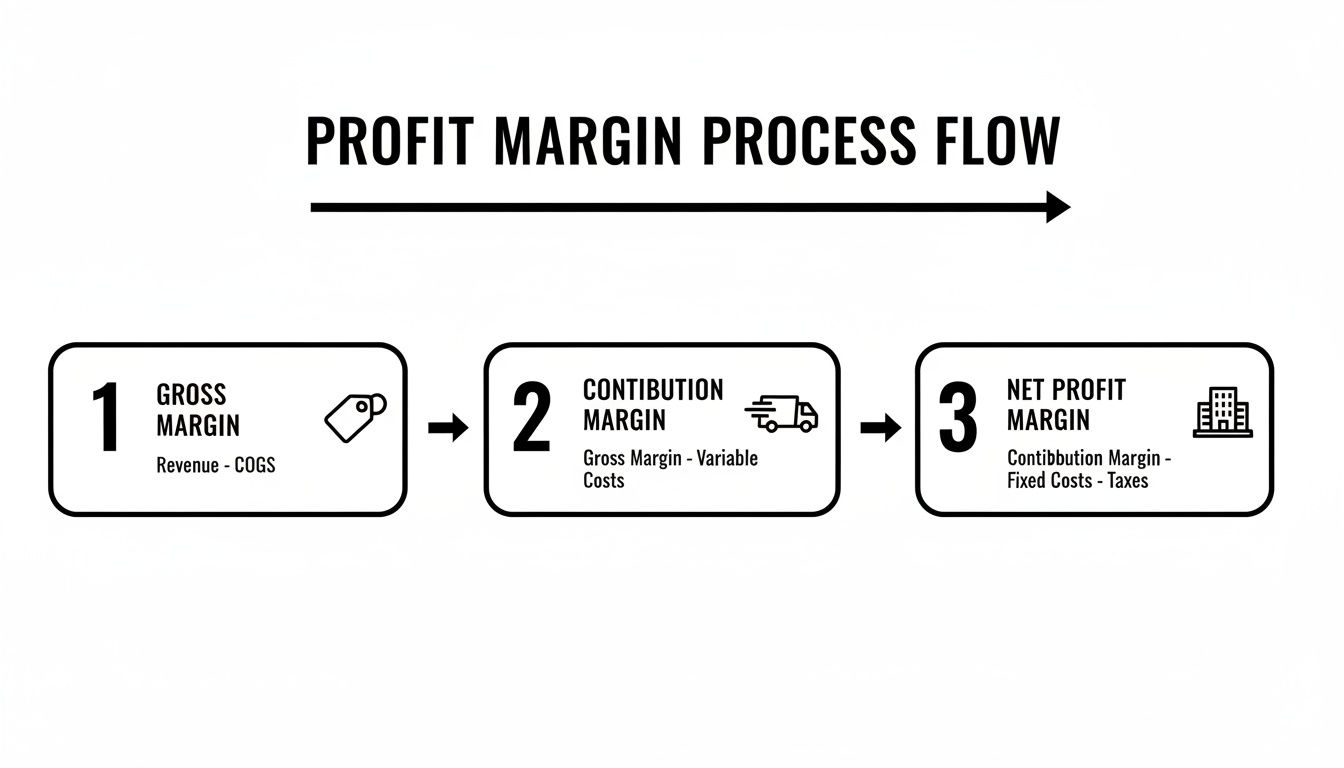
This visual really clarifies how we're drilling down. We start with the big picture (Gross Margin), then account for sales-specific costs (Contribution Margin), and finally get to the bottom line (Net Profit Margin).
Step 3: Find Your Net Profit Margin
We're almost there. The last step is to account for your fixed overhead—the costs of keeping the lights on, whether you sell one unit or one thousand. To find your true per-unit profit, you have to spread these costs across all your sales.
Let's say your total monthly overhead (salaries, rent, software like HiveHQ) is $10,000. And in that month, you sold 1,000 units of the Glow Serum. That means each unit needs to help cover $10.00 of overhead ($10,000 / 1,000 units).
Time for the final calculation:
Net Profit = $17.90 Contribution Margin - $10.00 Overhead Allocation = $7.90 per unit
Your final Net Profit Margin is 19.75% ($7.90 / $40.00).
So, that exciting $30.00 of initial profit has dwindled all the way down to $7.90. This journey from a 75% gross margin to a sub-20% net margin is a perfect example of why you can't afford to just look at top-line numbers.
Profitability Breakdown for a Viral Skincare Serum
To make this even clearer, let's put all those numbers side-by-side. This table gives you a snapshot of how each calculation provides a different, and progressively more accurate, piece of the profitability puzzle.
| Profit Metric | Formula Used | Example Calculation | Final Margin |
|---|---|---|---|
| Gross Margin | (Revenue - COGS) / Revenue | ($40 - $10) / $40 | 75% |
| Contribution Margin | (Gross Profit - Variable Costs) / Revenue | ($30 - $12.10) / $40 | 44.75% |
| Net Profit Margin | (Contribution Margin - Overhead) / Revenue | ($17.90 - $10) / $40 | 19.75% |
Seeing it laid out like this really drives the point home. Each metric tells a part of the story, but only Net Profit Margin tells you what you're actually banking. Understanding this full picture is essential for survival and growth on TikTok Shop.
Common Margin Calculation Mistakes to Avoid
Knowing the formulas for product margin is a great first step, but the real challenge is sidestepping the common pitfalls that can quietly eat away at your profits. A tiny miscalculation might seem harmless, but when it’s repeated over thousands of sales, the damage adds up fast.
Let's dive into some of the most frequent—and costly—mistakes we see brands make.
The single biggest error is confusing markup with margin. They sound similar, but they tell completely different stories about your profit. Markup calculates profit as a percentage of your cost, while margin measures profit as a percentage of your selling price. Treating them as interchangeable will dangerously overstate how much cash you're actually taking home from each sale.
Forgetting TikTok-Specific Costs
Another huge blind spot is failing to account for all the variable costs that are unique to selling on TikTok Shop. It’s easy to remember your core COGS, but the platform’s fees and commissions can quickly shrink your margins if you aren’t watching them like a hawk.
Here are a few costs that often get missed:
- Tiered Affiliate Commissions: Not every creator gets a flat rate. Many deals have performance tiers that change your commission cost per sale as they hit certain milestones.
- Platform Fees and Payment Processing: These small percentages might look insignificant on a single order, but they accumulate rapidly across all your transactions.
- Sample & Seeding Costs: Sending free products to creators isn't free for you. It's a marketing expense that directly impacts the profitability of your affiliate campaigns and needs to be tracked.
And if you sell across multiple channels, remember to account for other platform-specific expenses, like the hidden costs of FBA box content information mistakes that can pop up unexpectedly.
Using Outdated or Inaccurate COGS
The price you pay for your products is rarely set in stone. Supplier prices go up, shipping rates change, and even the cost of your packaging can fluctuate. If you're using a COGS figure from six months ago, you might think a product is a winner when it’s actually losing you money on every order.
This markup vs. margin confusion is a widespread issue. For instance, a 100% markup (doubling your COGS) actually results in a 50% margin. However, a 50% markup only yields a 33.3% margin. Recent pilots showed some sellers lost over 12% in profitability by misapplying this basic principle.
To stay ahead of this, you need a system. Regularly updating your COGS in a profit dashboard like HiveHQ ensures every margin calculation is based on today's numbers, not last quarter's. Accurate inputs are the only way to get a reliable picture of your financial health—and it's the bedrock for making smart decisions that actually protect your bottom line.
Automating Your Margins with a Profit Dashboard

While it's essential to know how to calculate your margins by hand, let's be honest: relying on spreadsheets is a slow-motion disaster waiting to happen. The moment you update one cell, ten others are already out of date. It’s a manual grind where hidden costs fester and golden opportunities slip through your fingers.
This is exactly why the top sellers on TikTok Shop don’t live in spreadsheets. They use dedicated tools, like the Profit Dashboard from HiveHQ, which does more than just replace your VLOOKUPs—it completely changes how you see your business's finances. By plugging directly into your TikTok Shop, it pulls all your data in real-time, automatically.
From Store Averages to Product-Level Clarity
The real magic of an automated dashboard is moving beyond vague, store-wide averages to get razor-sharp clarity on every single product. The guesswork vanishes. You’re no longer wondering which products are your winners; you can see them, plain as day.
A good profit dashboard crunches all the numbers for each SKU, all the time:
- Live sales revenue as it comes in
- Up-to-the-minute Cost of Goods Sold (COGS)
- Specific ad spend tied directly to a product
- Creator affiliate commissions for every sale
- Platform fees, shipping costs, and all the other little expenses
This is the kind of detail that lets you instantly spot your "hero" products—the high-margin items actually bankrolling your growth. More importantly, it exposes the "zero" products, the ones with high sales volume that are secretly bleeding you dry. This kind of visibility is crucial, and you can take it a step further by learning how to make a heat map to visualize sales trends.
This granular view is a game-changer. It allows you to move from reactive problem-solving to proactive strategy, optimizing your business one product at a time.
Armed with this kind of clarity, you can make smarter decisions, faster. You’ll know exactly when to tweak your pricing, push back on creator commissions, or finally cut that unprofitable product from your lineup. Automating your margin tracking gives you the financial confidence to scale your business with total precision.
Your Top Product Margin Questions, Answered
Diving into product margins, especially in the wild west of TikTok Shop, can stir up a lot of questions. Let's tackle some of the most common ones I hear from sellers to clear up any confusion and get you on the right track.
One of the biggest mix-ups? Margin vs. Markup. They sound similar, but they're telling you two very different things about your profit. Think of it this way: Margin is your profit as a slice of the selling price pie. Markup is how much you've increased the price from your original cost. Confusing the two is a classic mistake that can seriously inflate your perceived profitability, leading to some nasty surprises down the road.
So, What's a Good Product Margin Anyway?
This is the million-dollar question, and the honest answer is: it depends. A "good" margin in one industry could be a disaster in another. That said, we can use some general benchmarks as a starting point for e-commerce.
Here’s a rough guide to what your net margin might signal:
- A 5% net margin is pretty tight. It could be a red flag that your pricing is too low or your costs are too high.
- A 10% net margin is often seen as a healthy, average target for many online stores.
- Hitting a 20% net margin is fantastic. This usually means you have a very efficient, well-run, and profitable business.
For a platform like TikTok Shop, with all its commissions, ad spend, and fees, aiming for a net margin of 10% or higher is a great goal. It gives you enough breathing room to reinvest and grow sustainably.
A low margin on a high-volume product can still be a huge win, while a high margin on something that barely sells won't pay the bills. It's all about finding that sweet spot between profit per sale and the number of sales you can make.
Ultimately, don't get too hung up on a single number. The real goal is to understand your own business model, your overhead, and what you need to achieve your growth targets. The most important thing is to track your margins consistently, not just aim for an arbitrary percentage.
Ready to stop guessing and start knowing your exact profit on every single product? The HiveHQ Profit Dashboard automates these complex calculations in real-time, giving you the clarity to scale with confidence. Explore the HiveHQ Profit Dashboard today.