How to Calculate Impression on TikTok and Drive Growth
how to calculate impressiontiktok shop analyticscpm calculationtiktok marketinghivehq
At its core, calculating impressions is pretty straightforward. For paid ads, the classic formula is (Total Ad Spend / CPM) * 1000. If you're looking at organic content, it’s usually just the total number of views or the number of times your content was served up. Think of this as the first, most fundamental measure of your brand's visibility.
Why Impressions Are More Than Just a Vanity Metric
Let's get one thing straight: impressions aren't about chasing huge numbers to impress your boss. Especially for TikTok Shop sellers, they're the first real pulse check on your brand's visibility—the very top of your sales funnel. Every single impression represents a chance to get your product in front of a new potential customer.

This is a big deal if you're coming from a platform like Amazon, where the customer journey is completely different. On TikTok, a high volume of targeted impressions tells the algorithm your content is hitting the mark. That, in turn, can unlock even more organic reach and kickstart a powerful growth flywheel.
Shifting from Guesswork to Strategy
When you learn to calculate and interpret your impression data correctly, you stop guessing and start making strategic, data-backed decisions. It’s a foundational skill that empowers you to:
- Accurately measure campaign reach: Get a clear picture of the true scale of your advertising efforts. You might also want to check out our guide on https://www.hivehq.ai/blog/how-is-reach-calculated to see how these two key metrics play off each other.
- Optimize your ad spend: Pinpoint exactly which campaigns are getting the most eyeballs on your products for the best price.
- Evaluate creator performance: See which influencers are actually extending your brand’s visibility in a meaningful way.
An impression marks the moment a potential customer first sees your brand. Failing to measure this accurately is like trying to build a house without a foundation—your entire marketing structure becomes unstable.
Understanding the True Value
Before we jump into the number-crunching, it’s vital to grasp what social media impressions really represent. They provide the necessary context to make sense of other critical metrics like click-through rates (CTR) and conversions.
For example, seeing high impressions but a low CTR is a massive red flag. It tells you that your ad creative isn't resonating with the audience you're reaching. That’s a specific, actionable insight you can use to improve performance. This is how impressions become the fuel for smarter, more profitable decisions for your TikTok Shop.
The Math Behind Your Campaign's Visibility
Let's be honest, you don't need a PhD in advanced analytics to figure out your campaign's impression count. The core math is actually pretty straightforward, and once you get the hang of it, you'll unlock some powerful insights. For your paid ads, the most direct path to understanding impressions starts with what you spent and what it cost you.
The go-to formula here is built around your Cost Per Mille (CPM), or the price you pay for one thousand views.
It looks like this: Impressions = (Total Ad Spend / CPM) * 1000.
Think of it in practical terms. If you know how much you spent on a campaign and what the platform charged you for every thousand impressions, you can quickly work backward to find the total number of times your ad was shown. It’s a simple, direct link between your budget and your visibility.
Are You Reaching New People or the Same People?
Beyond just the raw numbers, you need to understand the relationship between how many people you're reaching and how often you're reaching them. This is where another simple, but crucial, formula comes into play.
Impressions = Reach × Frequency
Here's the breakdown:
- Reach tells you the number of unique people who saw your ad.
- Frequency is the average number of times each of those unique people saw it.
So, if you reached 10,000 unique individuals and they each saw your ad an average of 3 times, you generated 30,000 impressions. This distinction is everything. It helps you see if you're actually expanding your audience or just hammering the same small group with the same message over and over.
A high frequency isn't automatically a problem—sometimes it’s a deliberate strategy. But if you see your frequency creeping up while your click-through rate is tanking, that's a classic sign of ad fatigue. Your audience is telling you they're tired of seeing that ad.
Why This Is a Game-Changer on TikTok
This kind of math becomes incredibly powerful on a fast-moving platform like TikTok. For anyone running a TikTok Shop, getting a firm grasp on impressions demystifies growth and has a direct impact on your bottom line.
The interplay between reach and frequency is what fuels outcomes like the platform's staggering 58% purchase rate, which is driven by a global user base of 870 million people. When you keep an eye on e-commerce benchmarks—like the 2025 average CPM hovering around $3.21—you can put your own spending and performance into a much clearer context.
These calculations are the engine behind the massive sales volumes and billions in GMV we see on the platform. To dig deeper into these trends, it's worth exploring more detailed TikTok Shop statistics. Ultimately, tracking impressions is how you make sure your content, especially top performers like hauls and reviews, keeps driving results long after the initial launch.
Finding the Right Data Across Your Platforms
If you want to calculate your impressions accurately, it all comes down to one thing: good data. Knowing the formulas is a great start, but the real work is in tracking down the right numbers. Honestly, it can feel like a digital scavenger hunt, especially when you’re bouncing between multiple ad platforms, creator reports, and analytics dashboards.
The trick is to build a repeatable process you can trust. Let's start with the easy one: paid ads.
Pulling Your Paid Ad Data
For your paid campaigns, your single source of truth is almost always the native ad platform itself. If you're running ads on TikTok, for example, you'll want to head straight into the TikTok Ads Manager. From there, you can easily pull essential metrics like total ad spend, impressions, and reach right from your campaign reports.
This diagram breaks down the two main ways you can approach the calculation, depending on what data you have on hand.
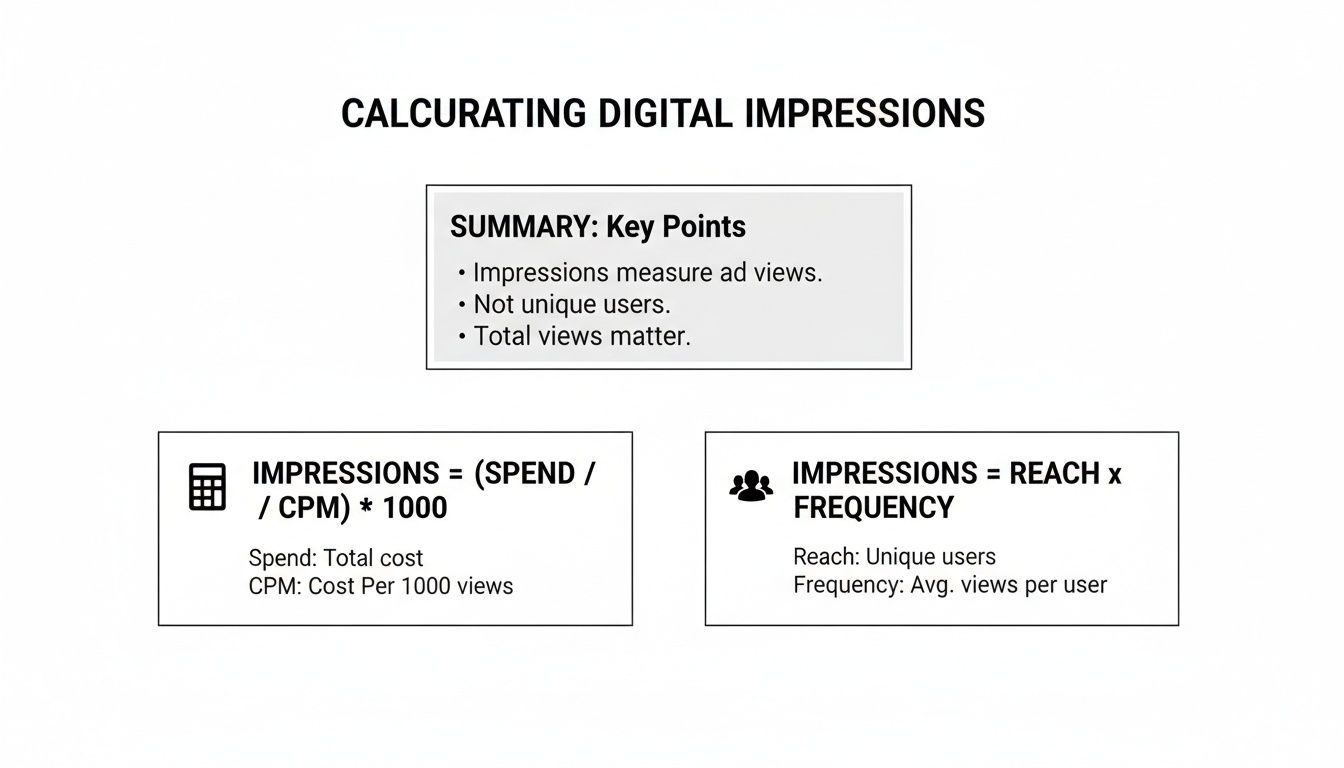
Whether you're starting from what you spent or who you reached, these formulas give you a clear path to figuring out your total visibility.
Tracking Down Creator & Affiliate Data
Things get a bit more fragmented when you're working with influencers and affiliates. While you can track direct affiliate performance inside TikTok Shop, you'll need to piece together data from a few different places to see the full picture.
Before you even start a partnership, the TikTok Creator Marketplace is your best friend. It’s perfect for vetting potential collaborators by looking at their historical reach and engagement stats.
Once a campaign is live, tools like Google Analytics become invaluable for tracking referral traffic. I always recommend creating unique UTM links for each creator. This lets you see exactly how many sessions their content is driving to your shop, connecting their content directly to your traffic.
My best advice? Set clear reporting expectations with creators from day one. Ask them to send over screenshots of their post analytics after a set period—say, 7 or 14 days. This gets you accurate, first-party data you can’t see publicly.
A Quick Guide to Your Data Sources
To make things easier, here's a quick-reference table that breaks down where to find the key metrics you'll need across the platforms most TikTok Shop sellers use.
| Platform | Metric Location | Key Metrics to Collect |
|---|---|---|
| TikTok Ads Manager | Campaign Reporting Dashboard | Spend, Impressions, Reach, CPM |
| TikTok Shop | Affiliate Management Tab | Clicks, Conversions, Commission |
| Creator Reports | Direct from Creator (Screenshots) | Post Views, Reach, Engagement Rate |
| Google Analytics | Acquisition > Traffic Acquisition | Sessions, Users, Conversions (by Source/Medium) |
| HiveHQ | Profit Dashboard | Consolidated Impressions, CPM, Spend, ROI |
This table should help you quickly pinpoint exactly what you need and where to find it, saving you from aimlessly clicking around different dashboards.
Why You Need to Consolidate Your Data
Let's be real: manually pulling numbers from all these places is a massive time sink. It’s not just tedious; it’s a recipe for human error, and those small mistakes can lead to big miscalculations. This is precisely why a centralized data hub is a game-changer.
For TikTok Shop sellers, the HiveHQ Profit Dashboard is designed to eliminate this manual grind. It automatically pulls and consolidates data from your ad campaigns, affiliate sales, and creator collaborations into a single, unified view. You can stop spending hours exporting CSVs and fighting with spreadsheets and instead get a real-time, accurate picture of your performance.
This isn't just about saving time. It's about building a smarter, more reliable data strategy. As your brand grows, having a mature analytics process is what separates the brands that guess from the brands that know. If you're curious about what that evolution looks like, you can explore the different stages of the analytics maturity model. Moving from manual tracking to an automated dashboard is how you graduate from just calculating impressions to truly understanding your business.
Putting Impression Calculations into Practice
Alright, enough with the theory. Let's get our hands dirty and see how this all works in the real world. I find that walking through a couple of practical scenarios is the best way to make these concepts stick. We'll look at two common ways to calculate impressions: one using a simple spreadsheet and another for the more data-savvy folks using a bit of SQL.
First up, we'll build a quick campaign tracker in something like Google Sheets or Excel—perfect for day-to-day monitoring. Then, we'll shift gears and see how a basic SQL query can pull the same insights directly from a database, which is incredibly useful when you're dealing with a ton of data.
Scenario 1: Tracking a TikTok Shop Campaign in a Spreadsheet
Let's say you're launching a new skincare product on TikTok Shop. Your campaign is split into three different ad sets, and you need to roll up the performance to see the big picture. This is where a spreadsheet becomes your best friend.
We can set up a simple table with a few key columns: Campaign, Ad Set, Spend, and CPM. Our main goal is to calculate the Impressions for each ad set and then tally up the total.
Here’s what that might look like:
| Campaign | Ad Set | Spend | CPM | Impressions |
|---|---|---|---|---|
| Skincare Launch | Top-Funnel Video | $500 | $2.50 | 200,000 |
| Skincare Launch | Retargeting Ad | $300 | $4.00 | 75,000 |
| Skincare Launch | Creator Collab Ad | $750 | $3.00 | 250,000 |
| Total | $1,550 | 525,000 |
So, how did we get those impression numbers? We just plugged our data into the formula right in the spreadsheet cell:
=(Spend / CPM) * 1000
For that first row, "Top-Funnel Video," the math is =(500 / 2.50) * 1000, which gives us 200,000 impressions. Drag that formula down the column, sum it up at the bottom, and you’ve got a clean, immediate snapshot of your campaign’s total reach.
This spreadsheet method is my go-to for quick analysis and reporting. You don't need any fancy software, and it's easy to expand it with other metrics like clicks, conversions, or ROI to build out a full performance dashboard.
Scenario 2: Using SQL for a Deeper Dive
Now for the more technical approach. If your company centralizes all its advertising data in a database, an analyst on your team would likely skip the spreadsheet and write a SQL query to get the numbers. This is way more efficient when you're sifting through mountains of data from dozens of campaigns.
Let’s imagine you have a database table called ad_performance. You could run a query like this one to calculate the total impressions for that same "Skincare Launch" campaign.
SELECT campaign_name, SUM((spend / cpm) * 1000) AS total_impressions, SUM(spend) AS total_spend FROM ad_performance WHERE campaign_name = 'Skincare Launch' GROUP BY campaign_name;
This query does the exact same job as our spreadsheet but on a much larger scale. It filters down to the right campaign, runs the impression calculation for every relevant entry, and then adds it all up to give you one solid number for total_impressions.
At the end of the day, it doesn't matter if you're in a simple spreadsheet or running complex queries. The logic for calculating impressions is the same. Getting comfortable with these practical applications is what really helps you move from just looking at data to actually making smart, informed decisions for your brand.
Using Impression Data to Make Smarter Decisions
So, you’ve pulled all your impression numbers together. What now? The count itself is just a number; the real magic happens when you start using that data to make sharper, more profitable decisions. This is where you graduate from simply knowing your visibility to understanding what to do next.
Think of your impression data as a diagnostic tool. It’s the first signal that tells you whether you're on the right track and helps you answer the questions that really matter. Are you even reaching the right people? Is your creative good enough to stop someone mid-scroll? Is your ad budget actually working for you?
Spotting Ad Fatigue and Creative Mismatches
One of the first and most practical uses for impression data is catching ad fatigue before it drains your budget. The key metric to watch here is frequency—the average number of times a person has seen your ad. If you notice your frequency climbing while your click-through rate (CTR) is simultaneously dropping, that’s the classic sign that your audience has seen your ad enough times. They’re officially tired of it.
This relationship between impressions and other metrics is where the insights live. A massive impression count paired with a miserably low CTR is a huge red flag. It means the platforms are doing their job showing your ad, but the ad itself isn't connecting with anyone.
Here’s a rule of thumb I live by: if your CTR is still stuck below 0.5% after you've racked up 50,000 impressions, it's time to pull the plug. Kill the creative, go back to the drawing board, and test something new. Don’t throw good money after bad.
Connecting Impressions to Your Bottom Line
At the end of the day, every metric you track should connect back to your return on investment (ROI). Impressions sit at the very top of your funnel, feeding everything else that follows. When you optimize for high-quality impressions, you're paving the way for better performance all the way down to the final sale.
This is especially true for sellers on newer platforms like TikTok Shop. If you're coming from the Amazon world, you have to shift your thinking. Impressions on TikTok are potential exposures, not just simple views, and they are what fuel the entire ecosystem. It’s how you tap into shop-level metrics and track your ad spend against things like the 81.3% repeat purchase rates we saw in early 2024. Those enormous impression volumes are what drive real results, with studies showing 71.2% of shoppers making a purchase after seeing products in their feeds. You can dig deeper into these trends in recent TikTok Shop analytics reports.
Finding Partners Who Deliver Real Results
Impression data is also your secret weapon for managing creator partnerships. When you're looking at potential influencers to work with, don't get distracted by a big follower count. That's a vanity metric. Instead, you need to dig into their average impressions or views per post to understand their actual, functional reach.
This is exactly what tools like the HiveHQ Creator Tracker are designed for. They help you look past the fluff and see which partners are actually delivering the visibility that turns into sales. By tracking impressions from each creator campaign, you can quickly identify your top performers and double down on the relationships that are truly growing your brand. It’s how you turn your creator program from an expense into a reliable, scalable revenue channel.
How to Automate Impression Tracking with HiveHQ
Let’s be honest: manually pulling impression data from a dozen different platforms is a grind. It’s not just tedious; it’s a surefire way to introduce errors that can lead you to make some really poor decisions. If you're serious about scaling your TikTok Shop, you have to get this process on autopilot. It's time to move away from clunky spreadsheets and into a streamlined workflow that gives you clear, actionable insights without the headache.

This is where having a central command center makes all the difference. The HiveHQ Profit Dashboard is built to be that single source of truth. It automatically syncs your ad spend and performance data, so you can stop worrying about how to calculate impression totals. The system does the heavy lifting for you, giving you back precious hours to actually focus on strategy.
Connecting Creator Impressions to Your Bottom Line
One of the toughest nuts to crack in this space is tying your influencer marketing spend directly to sales. The HiveHQ Creator Tracker is designed to solve exactly that. It links impressions from your affiliate posts directly to your Gross Merchandise Value (GMV), giving you a crystal-clear picture of your creator ROI. You'll know, without a doubt, which partners are driving visibility that actually converts.
On TikTok, impressions are simply the total number of times your content gets displayed—the very foundation of your campaign's reach. This is especially critical for sellers using HiveHQ's tools to scale their outreach. A good back-of-the-napkin formula is Impressions = (Total Ad Spend / CPM), and with the average e-commerce CPM hovering around $3.21, this gets interesting fast.
Once you dig into the data in the Profit Dashboard, you'll often find that a video with 50,000 impressions and a 2% conversion rate is infinitely more valuable than one with 500,000 low-converting views. It’s a classic case of quality over quantity. If you want to dive deeper into these metrics, Sprout Social has some great statistics.
Proactively Finding High-Impact Partners
Good automation isn’t just about tracking what’s already happened; it’s about fueling your future growth. This is where tools like the HiveHQ Affiliate Bot come into play, actively helping you find new partners who have a proven track record of high-impression potential.
By tapping into data from a network of over 500,000 creators, the bot lets you:
- Pinpoint creators whose audiences genuinely align with your brand.
- Filter for partners with a history of strong, consistent reach.
- Automate your initial outreach to build your affiliate program on overdrive.
This leap from manual busywork to an automated system is fundamental. It's how you stop just counting numbers and start building an intelligent, data-driven engine that truly powers your TikTok Shop's growth.
Ultimately, an integrated approach ensures you're not just drowning in data but using it to make smarter moves. If you're ready to take your strategy to the next level, you should look into our smart alerts and automation solutions that help you act on these insights in real-time.
Common Questions About TikTok Impressions
Even with the right formulas and data sources, it's easy to get tangled up in the details when you're deep in your TikTok analytics. Let's tackle some of the most common questions and points of confusion I see sellers run into. Getting these sorted will help you interpret your data with a lot more confidence.
A classic one is the difference between impressions and reach. Think of it this way: reach is the number of unique people who saw your ad, while impressions are the total number of times your ad was shown on a screen. If one person sees your ad five times, that’s a reach of 1 but a total of 5 impressions. This distinction is crucial for understanding ad fatigue and saturation.
Clarifying Performance Issues
"Why are my impressions high but my clicks are terrible?" I hear this all the time. This almost always signals a mismatch between your ad creative and the audience you're targeting. TikTok is doing its job and serving your ad, but the content itself just isn't compelling enough to make people stop scrolling and tap. It’s a clear sign you need to go back to the drawing board and test new hooks, visuals, or even a different audience segment.
Another huge piece of the puzzle is tracking accuracy. To make sure your impression data is reliable, the TikTok Pixel Helper is an essential tool. It’s a simple browser extension that confirms your pixel is firing correctly, which is the foundation for gathering trustworthy data for all your calculations.
One of the biggest mistakes I see is treating organic video views and paid impressions like they exist in separate worlds. The truth is, they're two sides of the same coin. Your paid impressions often give your organic content a nice little lift, and killer organic content makes your paid ads that much more effective.
Putting Insights Into Action
So, how often should you be digging into these numbers? It depends on what you're trying to do.
- For active campaigns: You need to be checking impression data daily. This lets you catch delivery problems or performance dips right away and adjust your budget or creative before you waste money.
- For big-picture strategy: A weekly or monthly check-in is usually enough. This helps you track progress against your main business goals and spot longer-term trends in what's working (and what's not).
And what about your organic, non-paid videos? Can you get impression data for those? Absolutely. In TikTok Analytics, the "Video Views" metric is the direct equivalent for your organic content. While there's no ad spend to factor in, tracking this number is key to measuring your content's organic visibility and its potential to go viral.
Ready to stop juggling spreadsheets and automate your growth? The HiveHQ Profit Dashboard consolidates all your impression data into one place, giving you the clarity to make smarter, faster decisions. See how it works at https://hivehq.ai.