How to Search Storefronts on Amazon: A Practical Guide
amazon storefrontssearch amazon sellersbrand store discoveryamazon product researchstorefront search tips
You're usually not failing at Amazon search, you're using the wrong starting point. If you want to search storefronts on Amazon without wasting time, start from a product page, follow the right link, and work outward into the seller or brand catalog.
I spend the most time on listings when I already know one item and I want the broader business behind it. That's the practical move, because one product page often tells you more than a keyword search ever will, especially when you're trying to understand merchandising, category focus, and whether a seller is really specialized or just broad.
Table of Contents
- Starting From a Product Instead of a Keyword
- The Core Search Methods and URL Patterns
- Brand Stores, Seller Catalogs, and Creator Storefronts Compared
- Turning One Listing Into a Full Catalog View
- Discovery Tactics Beyond the Amazon Search Bar
- Troubleshooting Common Storefront Search Problems
- Frequently Asked Questions About Amazon Storefronts
Starting From a Product Instead of a Keyword
Typing a brand name into Amazon often returns a messy mix of listings, ads, and half-relevant results. That is a slow way to research storefronts, because the search bar is built to surface products first, not to hand you a clean seller map.
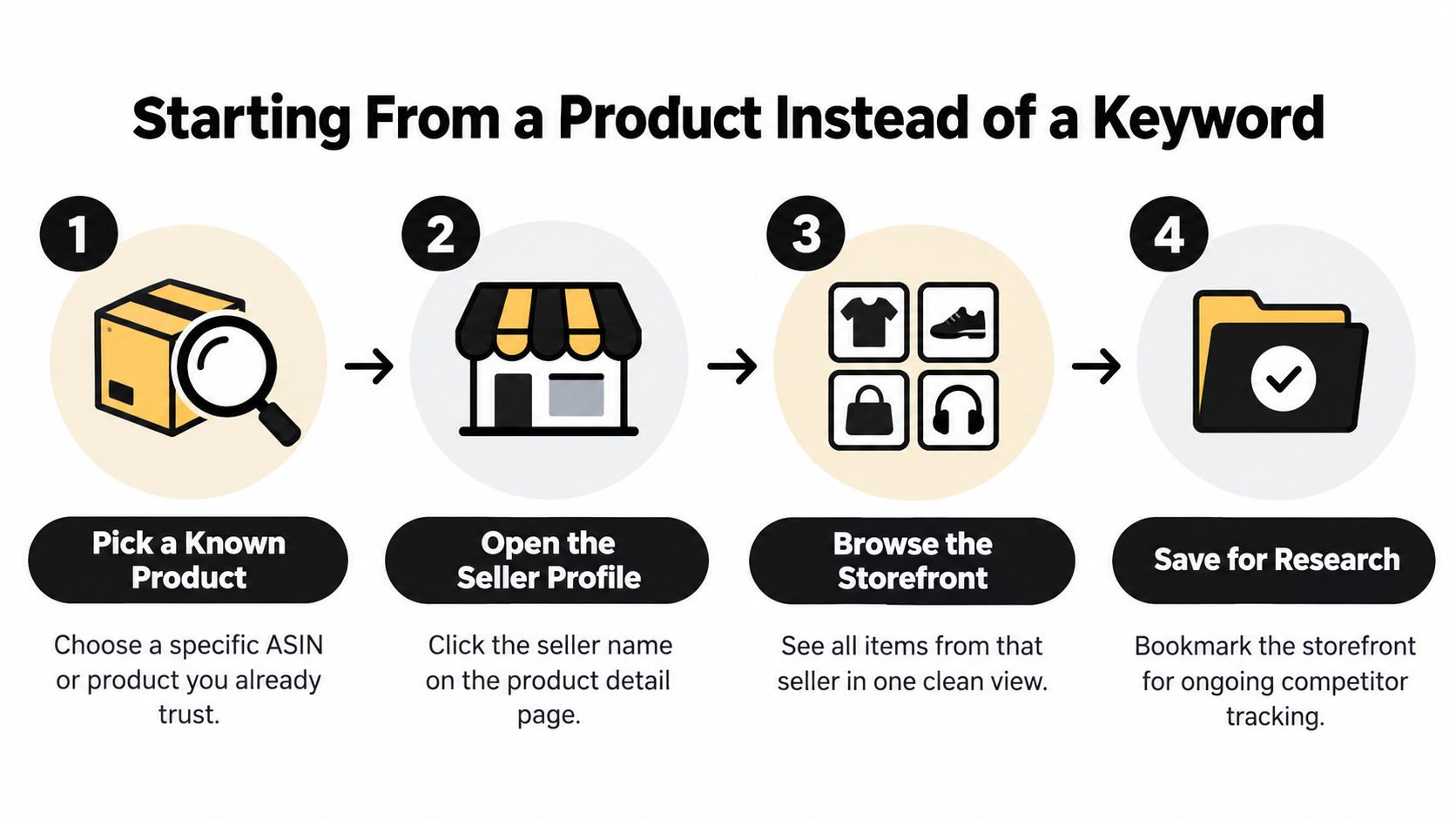
The cleaner route is to open a product detail page for something you already trust or recognize. From there, Amazon gives you two different paths, and they matter for different reasons. The brand link below the title takes you toward the brand's catalog. The Sold by merchant name takes you toward the seller behind that specific listing.
The decision rule that saves the most time
Use the brand path when you care about the brand's own assortment, packaging style, and product family. Use the seller path when you care about the merchant account fulfilling or listing the item, because that account may cover multiple brands or categories.
That distinction is the first thing I check in product research, and it keeps me from confusing a real brand catalog with a reseller's mixed storefront. If I'm trying to understand what a business sells, the seller path is usually the more revealing one. If I'm trying to understand how a brand presents itself, the brand path is the one that matters.
For a deeper look at how product-level performance connects to storefront research, I'd pair this workflow with product performance analytics.
Practical rule: if the page shows both a brand and a separate merchant, treat them as two different research objects until you confirm otherwise.
The Core Search Methods and URL Patterns
Once you've got a seller ID or a brand name, the rest becomes mechanics. The goal is to move from a vague search to a URL you can reuse, share, and revisit without guessing.
A reliable workflow starts with a known product detail page, then copies the seller ID from the merchant profile URL instead of relying on the visible display name. That matters because display names can change or overlap, while the seller ID anchors you to the account behind the listing. You can then construct the catalog URL directly with amazon.com/s?me=SELLERID or the profile URL with amazon.com/sp?seller=SELLERID to revisit the storefront later. For a practical comparison of those paths, see the table below.
| URL Pattern | What It Opens | When to Use |
|---|---|---|
amazon.com/s?me=SELLERID |
Seller catalog view | When you want the merchant's product lineup |
amazon.com/sp?seller=SELLERID |
Seller profile page | When you want seller details and identity checks |
/stores/ |
Brand Store | When you want the brand's own shopping destination |
/shop/ |
Creator storefront | When you want an influencer or creator page |
Search terms that actually help
You can also search a brand name, seller display name, seller ID, or a product-related keyword, but the results will often be mixed. That's why a broad search works better as a starting clue than as a final answer.
If the name is ambiguous, I go back to the product page and start over from the merchant link. If I already know the ASIN, that path is usually faster than hoping a search result will sort itself out. I also separate searching for a storefront, searching within a storefront, and browsing the storefront, because those are not the same task.
A storefront search should end with a reusable URL, not a screenshot you can't verify later.
Brand Stores, Seller Catalogs, and Creator Storefronts Compared
A lot of bad research happens because people land on the right page type for the wrong question. A Brand Store is a branded shopping destination tied to a specific brand, while a seller storefront belongs to a merchant account and can include products from several brands. A creator storefront is different again, because it's tied to a creator page rather than a merchant catalog.
Amazon's own store product page makes this split clear, and that distinction is useful when you're evaluating product assortment or business structure. If you want a helpful overview of the storefront concept itself, the Amazon Storefront guide is a solid reference point for the basic definitions. I'd still treat it as background reading, not a substitute for checking the page type you landed on.
| Type | Typical URL Cue | Best Use |
|---|---|---|
| Brand Store | /stores/ |
Brand catalog, merchandising, and positioning |
| Seller storefront | s?me= or seller profile |
Merchant inventory and cross-brand assortment |
| Creator storefront | /shop/ |
Creator-led discovery and content-driven shopping |
| Category hub | Browse-like Amazon navigation | Broad exploration, not account-level research |
What gets confused most often
The most common mistake is assuming every merchant has a Brand Store. That isn't true, and it wastes time when you're hunting for a catalog that doesn't exist in that form. The opposite mistake is treating a Brand Store as proof that you've found the merchant account behind the listing, when the seller may be a reseller or distributor.
When I'm checking a business with multiple listings, I always confirm whether I'm on the brand's destination or the seller's account page before I record anything. If the storefront mixes several unrelated brands, I treat it as a merchant catalog, not a single-brand page.
For sellers thinking beyond Amazon, the same storefront logic shows up in short-form commerce too, and this TikTok Shop playbook for established Amazon sellers is useful context for how catalog structure affects channel expansion.
Turning One Listing Into a Full Catalog View
Storefront research becomes useful for real product decisions at this point. Start with one ASIN you already know, open the product page, and click the merchant name next to Sold by if you care about the seller's catalog. If you care about the brand's own line, click the brand name or the Visit the Brand Store link instead.
Amazon launched Storefronts in the United States on September 17, 2018, with nearly 20,000 U.S. businesses from all 50 states and more than 1 million products across over 25 product categories at launch, which is a good clue about how the format was meant to work, by merchant identity and category rather than isolated keywords (Retail Dive). That design choice matters in practice, because a storefront view shows breadth, category concentration, and merchandising logic in a way one listing never can.
A simple catalog review workflow
- Copy the seller ID from the merchant profile URL.
- Open the catalog view with the seller endpoint.
- Scan the category mix to see whether the account is focused or scattered.
- Sort mentally by price and review patterns to spot entry items versus premium items.
- Save five to ten representative ASINs so you can compare them later.
When I do this, I'm looking for repeat patterns, not isolated hero products. If the catalog leans heavily into one niche, that tells you something about positioning. If the account stretches across unrelated categories, it may be a reseller, not a brand owner.
What to record every time
- Marketplace domain, so you know which country you're looking at.
- Storefront type, so you don't mix a brand page with a seller catalog.
- Seller ID, so you can revisit the exact account later.
- Representative ASINs, so you can compare listings across time.
- Category mix and price bands, so the catalog's shape is visible at a glance.
For teams that want to connect product performance back to the catalog level, complete seller playbook is a helpful companion read.
One product page can expose a whole merchant strategy if you stop at the right two clicks.
Discovery Tactics Beyond the Amazon Search Bar
Amazon doesn't give you a clean, universal directory of creators or niche storefronts, so you have to discover them from adjacent layers. That means the practical work often happens outside Amazon first, then inside Amazon once you've found a likely match.
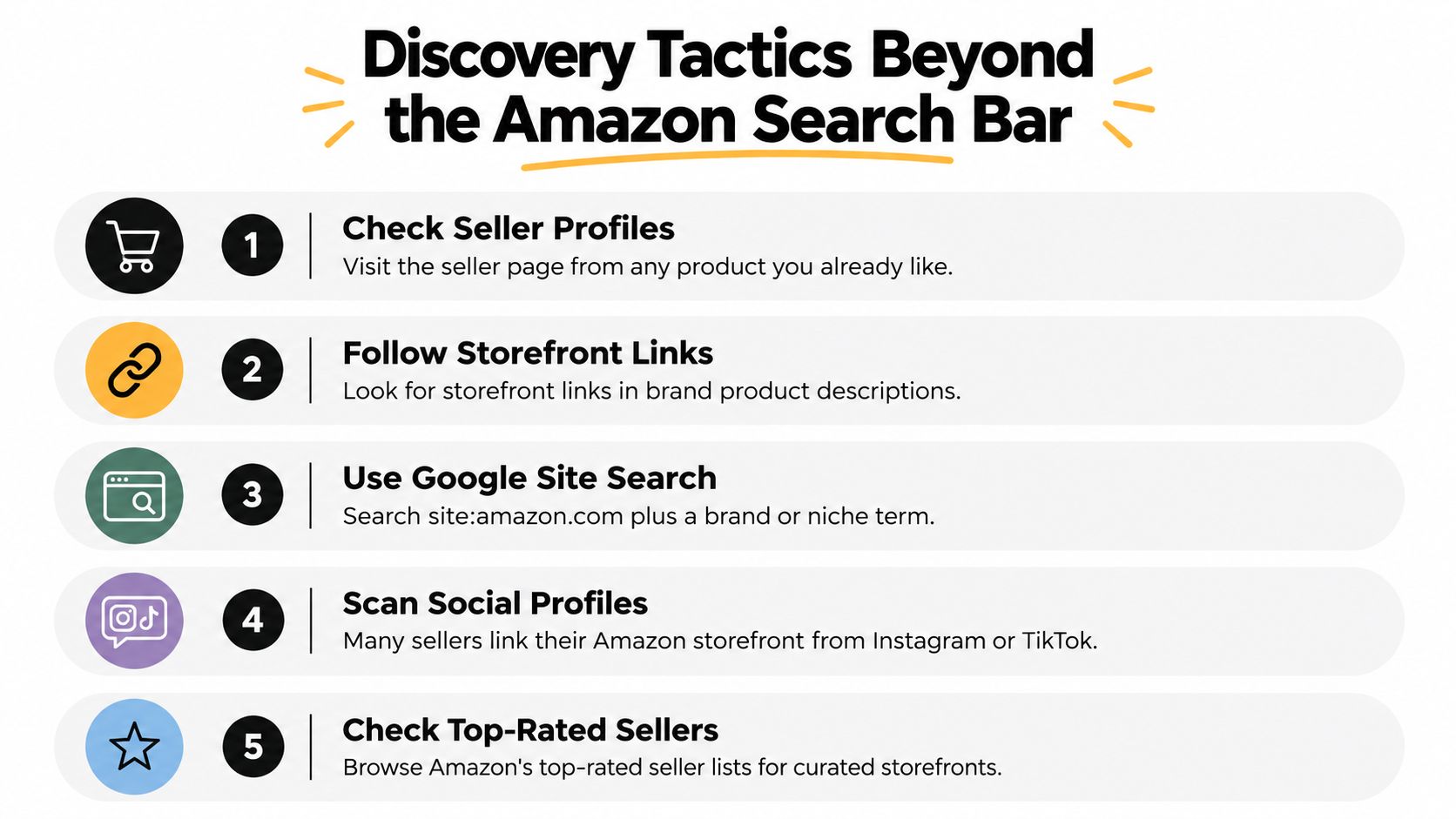
I start with brand-name searches that include terms like store or official when I already know part of the brand. If that fails, I use a site-restricted Google query such as site:amazon.com/shop plus the niche or creator name. That's often faster than trying to force Amazon's own search bar to behave like a directory.
Where discovery usually works best
- Social bios: creators often place their storefront links directly in profile bios or linked pages.
- Amazon Live: useful for spotting active creators who already publish shopping content.
- Hashtag trails:
#FoundItOnAmazoncan surface storefront-linked content worth checking. - Brand pages outside Amazon: often the storefront link is buried in a social post, not on Amazon itself.
- Google search: the most practical discovery layer when you need a shortlist, not one known page.
The limitation is simple. Amazon is good at conversion and browsing, but it isn't a complete creator search database. That's why discovery is usually a two-step process, find the page elsewhere, then verify it on Amazon.
For sellers who want a broader content-to-commerce view, how TikTok Shop drives top-of-funnel awareness for Amazon brands is relevant context.
Troubleshooting Common Storefront Search Problems
A storefront can look right at first glance and still send you to the wrong account. The quickest fix is to check the URL pattern, the marketplace domain, and who owns the buy box before you save anything for research.
Common failure modes and fixes
- Ambiguous seller display names: the name matches more than one account, so use the seller profile URL and the product page together before you record it.
- Dead or missing storefront links: if a link breaks or leads to a blank page, start from the product listing and follow the seller path again.
- Region-locked storefronts: a page on one marketplace can show a different catalog in another, so match the country domain to the market you are studying.
- Outdated product listings: an inactive page can still appear in search, so check whether the catalog still shows recent activity.
- Multi-brand seller catalogs: unrelated brands on the same page usually mean a merchant catalog, not a single brand store.
- Other sellers on the product page: the buy box may sit with a different merchant, so open the seller links before you assign ownership.
Amazon's German Storefronts launch on September 17, 2018 showed that the format was built for major international markets, not just the U.S. (About Amazon EU). That matters because a storefront that looks sparse or unfamiliar may belong to the wrong marketplace.
For one more verification layer, use the seller profile's business information, feedback history, and category spread before you rely on it for research, and remember that off-Amazon traffic shapes how these pages perform, as explained in how TikTok Shop impacts your Amazon ranking.
Frequently Asked Questions About Amazon Storefronts
What's the difference between a Brand Store and a seller storefront?
A Brand Store is tied to a brand, while a seller storefront belongs to a merchant account and can include multiple brands.
Does Amazon have a true storefront search engine?
Not really. Amazon's search can help you find starting points, but Google and product-page navigation are usually better for systematic discovery.
Why do the same brands look different across Amazon countries?
Amazon storefronts are marketplace-specific, so assortment, presentation, and availability can change by region.
What if a storefront shows unrelated brands?
Treat it as a seller catalog, not a single-brand page, and verify the merchant details before using it in research.
How does storefront research help sellers?
It shows catalog structure, category focus, and merchandising patterns, which makes competitive research and expansion planning much more grounded.
Storefront-level research matters even more when you start evaluating short-form commerce channels, because you need to know whether the products behind the page support your margin goals and operational plan. That's where unit economics, product mix, and customer behavior need to line up, not just the search result you clicked.
If you're using storefront research to make real product decisions, bring those findings into the HiveHQ Profit Dashboard so you can tie catalog observations back to real-time net profit, product-level performance, and customer analytics. Visit HiveHQ to see how HiveHQ helps sellers run self-serve profit analysis, then talk to the HiveHQ team about connecting what you found on Amazon to what's making money.