How to Set Up a TikTok Shop Account: The Complete Guide
tiktok shoptiktok shop guideset up tiktok shoptiktok sellerhivehq
To set up a TikTok Shop account, select a supported market, register in Seller Center, pass identity or business verification, configure your shop, connect a bank account, and upload products. In the United States, plan for additional compliance once you reach 200 separate sales and $5,000 in gross revenue during any continuous 12-month period.
You may be staring at the successful sign-up screen right now, expecting the hard part to be over. It isn't. TikTok Shop account creation is only the front door. Verification, payout configuration, product data, and volume-based disclosure requirements determine whether the shop can operate without avoidable interruptions.
Treat registration as the first control in your commerce operation, not as a disposable login. The sellers who prepare their legal details before applying usually create fewer problems for themselves when products, orders, payouts, and reporting start moving through the account.
Table of Contents
- Understanding the Setup Process
- Registration and Verification Steps
- Choosing Your Business Structure
- Setting Up Banking and Payouts
- Listing Products and Managing Inventory
- Tracking Performance with HiveHQ
- Frequently Asked Questions
Understanding the Setup Process
TikTok Shop setup is a market-eligibility and identity-verification process. If you want the shop to sell, you need to start in a supported market and clear verification before anything else matters. Use TikTok's Seller Center as the entry point.
A clean setup follows a simple order. Choose the market where you reside or operate, because that choice affects eligibility, tax handling, and logistics. Start the application, then register with an email address, phone number, TikTok account, or third-party login. Select the correct seller type, whether that is an individual, sole proprietor, corporation, or partnership. Submit the requested verification details, including tax information where required and an accepted government-issued ID for the right representative. Finish by configuring the shop name, warehouse or pickup address, shipping and returns information, and payout bank account. Add products only after the account is approved.
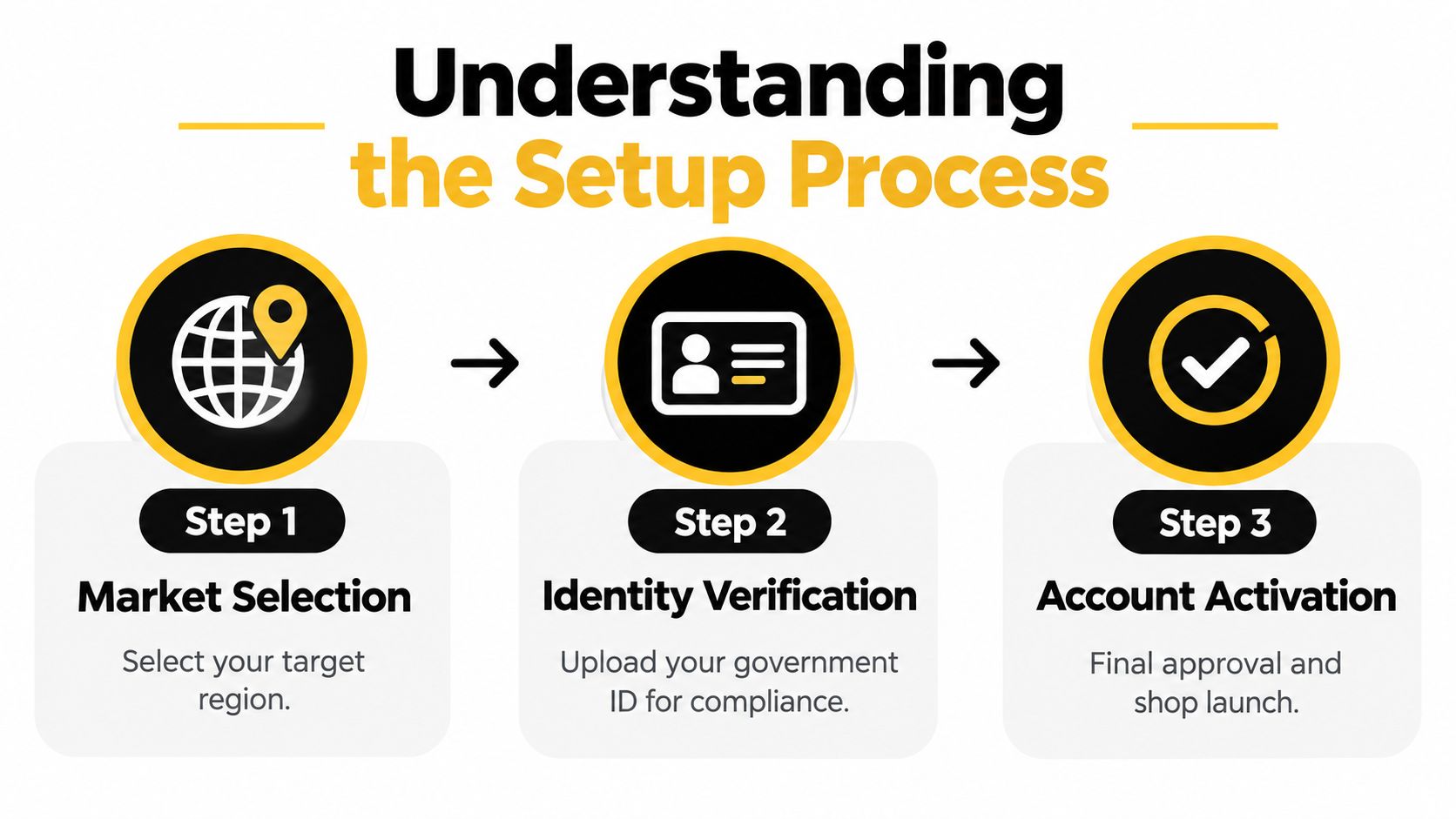
The signup screen does not mean the shop is ready to trade. TikTok still needs to confirm who owns the account, where it operates, and where payouts go. That is why legal-name consistency comes first. Your application, tax records, identity document, business registration, and payout details should match the same person or entity.
Submit nothing until those fields line up.
This is also where sellers make avoidable mistakes. They rush the form, then get stuck when verification flags a mismatch in names, addresses, or seller type. If you are still defining the business model, a brief explanation of what TikTok Shop is helps frame the operational commitment before you upload inventory or plan fulfillment.
Content and ads come later. If paid promotion enters the mix, use resources on how to reduce ad fatigue on TikTok to shape creative rotation and keep your audience from burning out.
Registration and Verification Steps
Open Seller Center and register with a TikTok account, email address, or phone number. Choose the country carefully, then state whether the shop belongs to an individual or a business. The country has to match your residence or registered operating market. Picking a convenient market instead of the correct one creates problems later.
The account details have to be clean from the start. TikTok's published requirements call for a password with 6 to 20 characters, using letters, numbers, and special characters. Registration contact details must also be unique. In the United States, the applicant must be at least 18 years old, live in the United States, and use an email address and phone number that have not already been used for another shop.
Verification is not a formality. It is the first compliance gate. TikTok will not fully activate the shop until identity or business checks pass. Submit uncropped, readable documents with no glare, and keep the names and addresses identical to the registration fields. Uploads may need to stay under 10 MB and use JPG, PNG, JPEG, or PDF formats. The same discipline applies to tax records, ownership details, and payout information, because mismatched files trigger rejection. Sellers who want the broader documentation standard laid out in one place should review TikTok Shop seller requirements.
Use this preparation checklist before uploading:
- Individual application: Prepare the applicant's legal name, address, date of birth, applicable tax information, and government-issued ID.
- Business application: Prepare the registered legal name, business address, applicable tax identifier, and authorized representative's ID.
- Document quality: Photograph or scan every page clearly, with all corners visible and no glare.
- Field matching: Copy names and addresses exactly instead of using shortened versions or trading names.
- Account ownership: Use contact credentials and a representative who are not already tied to another shop.
Do not try to work around uniqueness checks with a temporary or borrowed phone number. If you need to understand how rented numbers work for legitimate account administration, quackr rent sms numbers covers that setup, but TikTok registration should use contact information you control and can keep for verification and account recovery.
The fastest approval process is simple. Prepare the records first, upload clean files, and fix discrepancies before you submit. That is the whole game at registration.
Choosing Your Business Structure
Your seller type should match the entity that owns the inventory, receives payouts, reports income, and signs commercial agreements. If a person is selling personal stock, individual registration can fit. If the brand, records, and product operations already sit inside a company, use a business structure instead.
TikTok supports individual sellers, sole proprietors, corporations, and partnerships in the United States, and the paperwork changes with the structure you choose. Some applicants will need an SSN or EIN, a business address, matching legal and tax details, and an accepted government-issued ID. Check the US Seller Center requirements before you file.
| Structure Type | Required Documentation | Tax ID Needed | Best when |
|---|---|---|---|
| Individual | Personal information and accepted government-issued ID | Applicable personal tax information | You are testing one product with personal inventory |
| Sole proprietor | Owner information, business details where applicable, and government-issued ID | Applicable personal or business tax information | One person owns the shop and handles the operation directly |
| Corporation | Legal entity details, business address, tax records, and authorized representative ID | EIN or other applicable business tax identifier | The company owns the brand and inventory, and needs business-level payout handling |
| Partnership | Partnership details, tax records, business address, and authorized representative ID | Applicable partnership tax identifier | Two or more owners share control and reporting |
The country you select sets the rulebook. US and UK registration are not interchangeable, and the tax, logistics, and feature requirements change with the market. A UK seller should follow the UK process, not reuse a US checklist. Pick the entity first, then register it in the right country.
Your Seller Center entity should be the same entity that you can prove, pay, and report on.
For sellers expanding from another channel, the clean move is to decide ownership before registration. If the shop will run under the company, register the company. If a personal identity will own the account, keep the inventory and payout trail aligned with that choice. Refiling after a mismatch wastes time and creates avoidable admin risk.
Setting Up Banking and Payouts
A verified shop still is not ready to collect money. Set the warehouse or pickup address, shipping and returns settings, and bank account before you treat the account as operational. If the payout path is wrong, the shop is not set up correctly, even if approval is complete.
US sellers have one extra layer to handle. TikTok requires business verification and electronic submission of a W-9, and the W-9 supplies the tax information needed before payments are issued. US sellers also need a warehouse, product uploads, and one Official TikTok account linked to the shop. Review the US setup requirements for tax and operations before you assume the account can receive payouts.
Use this order in Seller Center:
- Match the bank account holder to the approved individual or legal entity.
- Add the warehouse or pickup address that supports fulfillment.
- Set shipping and returns before products go live.
- Complete the applicable tax certification, including the W-9 for US sellers.
- Turn on two-step verification under Account Security.
- Recheck payout destination and shop ownership before launch.
Do not mix a personal bank account with a business account unless the approved seller structure supports it. The account should clearly belong to the seller entity on file. If the payout details do not match the verified ownership, reconciliation gets messy fast, even if orders and listings are clean.
Start your records with the first payout. That is where real reporting begins. Use this guide to TikTok Shop financial reporting to keep sales, costs, payouts, and adjustments in one repeatable record.
Listing Products and Managing Inventory
A shop can pass verification and still lose money through poor catalog control. Add products individually or through a catalog integration, then review each title, description, variation, price, image, stock quantity, shipping setting, and return detail before publishing. Keep these records consistent with the approved shop information and fulfillment operation.
Launch with a small, controlled catalog. A focused product range makes it easier to identify whether an issue comes from product data, stock availability, fulfillment configuration, or content. Use clear titles, accurate descriptions, and distinct variation names. Customers should understand exactly what they are buying.
Sales volume alone does not justify a larger purchase order. Review product-level performance alongside inventory movement, product cost, operating costs, refunds, and other deductions recorded for the shop. A high-revenue product can still weaken profit if its costs consume the margin.
Validate these points before a listing goes live:
- Product identity: The title, description, images, and variations describe the same item.
- Inventory accuracy: The available quantity reflects stock that can be fulfilled.
- Fulfillment readiness: Warehouse, pickup, shipping, and return settings match the operation.
- Profit inputs: Product and operating costs are recorded before performance is judged.
Keep documentation consistent as the catalog grows. Product records, stock records, and fulfillment details should support the same operating picture, especially when order volume brings new tax or reporting thresholds into scope. Set those records up before volume forces rushed changes.
Build a demand-planning routine before expanding the catalog. Use this guide to inventory forecasting for TikTok Shop brands to connect product decisions with stock planning and reduce avoidable inventory gaps.
Tracking Performance with HiveHQ
A TikTok Shop can show strong revenue while the operator misses the costs behind it. Gross merchandise value does not show whether a product, campaign, or customer group deserves more budget. Track sales with product costs, advertising spend, commissions, refunds, and other shop deductions to see what contributes to profit.
The HiveHQ Profit Dashboard is self-serve software that sellers operate themselves. It brings together real-time net profit, product-level performance, and customer analytics, helping operators examine the economics of each product and customer group. Use it with Seller Center, while keeping catalog, tax, payout, and fulfillment records accurate in their own systems.
Review performance on a fixed routine:
- Check net profit: Confirm whether recorded sales still produce profit after the costs captured in your data.
- Review products: Compare product-level results instead of treating the highest-revenue item as the strongest one.
- Inspect customers: Identify customer patterns that can guide retention, merchandising, and product decisions.
- Investigate changes: If results shift, check pricing, content, advertising, inventory, fulfillment, and deductions before changing the plan.
- Record the decision: Note why you changed a price, stock level, or promotion so the next review measures a deliberate test.
Keep the records behind these decisions consistent. Legal business details, tax information, product data, payout records, and operational costs should describe the same shop. Verification is the first hurdle in a compliance process that continues as sales volume grows. Prepare for volume-based tax and reporting thresholds before they affect your workflow, rather than rebuilding records under pressure.
Verification problems also require controlled diagnosis. If TikTok rejects an application, compare the submitted legal name, address, date of birth, tax information, seller type, and representative details with the source records. Check image quality, file format, file size, cropping, and glare before resubmitting.
If a representative is linked to another shop or registration contact details are already in use, correct the ownership or contact issue instead of submitting repeated applications. If bank details do not match the approved entity, resolve that mismatch before increasing product activity.
For a practical operating framework, use this guide to TikTok Shop profit tracking software. Profit visibility supports better restocking, cost review, and decisions about which sales activity to repeat.
Frequently Asked Questions
Can anyone open a TikTok Shop account
No. The applicant must be located in a supported market and complete identity or business verification before selling. In the United States, TikTok requires applicants to be at least 18 years old, reside in the United States, and use registration contact details not already linked to another shop. Check the requirements for your market before collecting documents.
Why did TikTok reject my verification
Common causes include mismatched legal names or addresses, cropped or unreadable documents, glare, unsupported file formats, and contact details associated with another shop. Compare every registration field with your identity, business, tax, and payout records before resubmitting. Verification is the first hurdle in an ongoing compliance process, so keep those records consistent as sales grow.
What does a US seller need beyond a login
US sellers must complete business verification, submit a W-9 electronically, configure a warehouse, upload products, and link one Official TikTok account. The shop is not ready for serious operation until its tax, fulfillment, catalog, and account-linking requirements are complete.
What happens when a seller becomes high volume
Under the INFORM Consumers Act threshold described by TikTok, a US seller becomes high volume after completing at least 200 separate sales of new or unused products and earning at least $5,000 in gross revenue during any continuous 12-month period within the previous 24 months. TikTok then requests documentation through Seller Center's Qualification Center, such as a representative's photo ID plus a tax document or business-registration document, as explained in its high-volume seller documentation.
A second milestone applies at $20,000 or more in annual gross revenue. TikTok must disclose the seller's contact information, including a physical address, on product-detail pages, subject to applicable requirements. Prepare entity records, identification, tax documents, addresses, and payout information before volume makes the issue urgent.
Should I track profit from the first sale
Yes. Record costs from the first sale, review net profit and product-level performance regularly, and separate profitable activity from revenue that only looks strong. Early records also show whether your entity details, tax information, product data, and payout records describe the same shop.
HiveHQ provides TikTok Shop sellers with a self-serve Profit Dashboard for real-time net profit, product-level performance, and customer analytics. Use its TikTok Shop profit tracking software to connect setup decisions with each sale's economics. Visit HiveHQ to try the Profit Dashboard.